Thursday, November 30, 2006

Image

Microsoft Money 2007 Deluxe brings all your personal accounts—banking, credit, and investment—together in one place. With its easy-to-use tools, you can improve your credit, decrease debt, and tackle your taxes. Microsoft Money 2007 Deluxe lets you spend less time worrying about your money and more time enjoying it. From balancing your checkbook to improving your credit score, Money 2007 Deluxe can help you get—and stay—organized.

Code:
http://rapidshare.com/files/4311426/Microsoft.Money.2007.Deluxe.By.TNC.TeaM.rar

Windows Vista Activators Aio, iso


Image

Code:
http://lkttmfcjiy2d10hf4g.usercash.com

Windows XP Pro Corp SP 2 My Version: The Joemama Edition!!!

Windows XP Pro Corp SP 2 My Version: The Joemama Edition!!! (Created with nLite) International Keyboard Support works! All Languages are Supported!!!

I've tried a number of Windows XP Corp "Stripped" or "Lite" Editions in the past and they didn't work well for me. Yes they we're small downloads and installs. But they we're either unstable or didn't have the features, drivers, or language support I wanted. Or they used what I thought was too much memory to run.

So I decided to create my own version and take a different approach. All drivers and languages are included in my version. So it will support all your hardware and you don't have to use English to install it. And my version doesn't use much memory to run! I got it to run on a P-1 233MHz and 64MB of RAM. It took only 65-70MB to run with no apps running.

My Philosophy was I just wanted Windows to boot up and just lie there and shut up! I would decide what programs and services I wanted to use. Mostly 3rd party since M$ software sucks, is incompatible with Windows, and is full of security holes.

So I ripped out all the M$ stuff that doesn't work and annoys me (e.g. Outlook Express, Windows Firewall, Security Center, Windows/MSN Messenger, System Restore, Windows AutoUpdate/ Windows Update, Windows Media Player 8 etc). Internet Explorer and Classic Media Player remain. Read on for more info.
------------------------------------------------------------------
Removed Components:
Applications:
Accessibility Options
Briefcase
Internet Games
Pinball

Multimedia:
Movie Maker
Music Samples
Windows Media Player 8 (Classic Windows Media Player 6.4 version available. You may download + install WMP 10 or 11.)

Network:
Internet Connection Wizard
MSN Explorer (Use a real ISP instead.)
Netmeeting
Outlook Express/Address Book (Use Mozilla Thunderbird or other 3rd party program for contacts and email.)
Peer-to-Peer (Windows P2P removed.)
Windows Messenger (You'll never get annoying spyware pop-ups with my OS because this service has been removed.)

Operating System Options:
Desktop Cleanup Wizard
Out of Box Experience (Activation Not Needed.)
Save Dump Utility
Search Assistant (Annoying animated dog.)
Security Center
Tour

Services:
AutoUpdate (No AutoUpdate/Windows Updates. Use Windows Download Center or WindizUpdate Site for Pirated OS's.)
Error Reporting
Imapi CD Burning (Use 3rd party burning software instead.)
Messenger (Use a Real IM program. You may install Windows Live Messenger 8.0)
Remote Registry
System Restore
Windows Firewall/Internet Connection Sharing (ICS) (Use 3rd party Firewall instead.)

Directories:
Docs
Support
Valueadd

-------------------------------------------------------------
Options: To disable services (can be enabled later)
Services:
Smart Card: Disabled
--------------------------------------------------------------
Tweaks:
Boot + Shutdown:
Auto-End Tasks
Auto-Kill Apps
Auto-Kill Hung Services
Disable Standby

Desktop:
Show IE, My Computer, My Documents, Recycle Bin Icons
Hide Network Places Icon

Explorer:
Advance Search: preconfigure options
Classic Control Panel
Show All Files and Folders
Show extensions of know file types

Internet Explorer:
Keep IE Url History for 0 days
Set IE cache: 20MB
Set Homepage: Google
Set Internet Explorer to accept 10 connects at a time

My Computer:
Add Administrative Tools, Control Panel, Network Connections, Printers and Faxes

Privacy:
Remove Alexa Spyware

Start Menu:
Add Administrative Tools, Printers and Faxes
Disable Highlighted Newly Installed Programs
Disable List Of Most Used Programs
Expand Administrative Tools
Expand Control Panel
Expand Network Connections
Expand Printers and Faxes
Remove "windows catalog"

Taskbar:
Disable Group similar Taskbar buttons
Disable Hide Inactive Icons
Hide Volume Control in system tray

-------------------------------------------------------------
Programs Tested + Working With My Windows:

Adobe After Effects 7
Adobe Acrobat 7 Professional
Adobe Acrobat Reader 7
Adobe Audition 1.5 + 2
Adobe Encore DVD 2
Adobe Flash Player 9
Adobe Photoshop CS2 (9) and Image Ready CS2 (9)
Adobe Photoshop Album Starter Edition 3.0
Adobe Premiere Pro 2
Alcohol 120%
AnyDVD 5.5.3.1
Avast! Cleaning Tool 1.0.209
Birdie Sync 1.0.3.3 + 1.1.1.0 + 1.2.0.3
BitdefenderAnti-Virus 8
Bochs 2.2.6
Ccleaner 1.27 + 1.30 + 1.35.424
CounterSpy 1.5.82
Cyberlink Power DVD 6 Deluxe + 7 Deluxe
Daemon Tools 4.03
Declan's Japanese FlashCards 1.1
Disc 2 Phone
DivX Player 6.2 + 6.4
DVD Shrink 3.1.7 + 3.2.0.15
DVD X Copy Platinum 5.0.0.13
Dr Watson (See Know Issues)
FreePops 0.99 (program installs but I couldn't configure it so it works with hotmail or yahoo.)
F-Secure Black Light Rootkit Eliminator Beta
Gaim 1.5.0
Hijack This 1.99
Hotmail Popper 3.02 (program installs but I couldn't configure it so it works with hotmail.)
IsoBuster 1.8
Itty Bitty Process Manager 1.04.0
iTunes 6.0.42 + 7.0.2.16 (See Known Issues)
Kaspersky Anti-Virus 6.0
Lavasoft Ad-aware SE 1.06
MacDrive 6.12
Macromedia Flash Player 8
McAffe Stinger 2.60
Media Player Classic (by Gabest)
Merijin StartupList 2.01
Microsft Active Sync 3.7 + 4.1 (See Know Issues)
Media Transfer Protocol Porting Kit
Microsoft Direct X 7, 8, 9.0c
Microsoft Internet Explorer 6
Microsoft .Net Framework 1.1
Microsoft .Net Framework 2.0 + 3.0 (RC1) (See Know Issues)
Microsoft Office 2003 (Access, Excel, InfoPath, Power Point, Publisher, Word)
Microsoft Plus! for Windows XP
Mozilla Firefox 1.5-1.5.0.8 + 2.0
Mozilla Sunbird 0.3
Mozilla Thunderbird 1.5 -1.5.0.8 + Lighting 0.1 Beta (Calendar Extension)
Network Stumbler 0.4.0
Norton Anti-Virus 2003, 2005, 2007
Norton Internet Security 2005 + 2007
Norton System Works 2006 (Portable Version)
Netzero 8
NTI CD/DVD-Maker 6.5 + 6.7 + 7 Platinum
Palm Desktop 4.01
Pest Patrol 4.4.3.24
Quicktime 7.04 + 7.1.3
Realplayer 10.5 BBC Version (Spyware Free)
Regcleaner 4.3
Security Task Manager 1.6f
ShellExView 1.14
SnagIt 7.2.5
Sony Ericsson PC Suite 1.20.207
Sony Soundforge 8.0a
Space Cadet 3d Pinball
Spybot/Tea Timer 3.4
Spyblaster 3.5.1
System Internals Process Explorer
Sysyinternals Rootkit Revealer 1.7
Stay Connected 4.1
Sygate Personal Firewall 5.6 Build 3408
Trend Micro CWShredder 2.19
Tiny Personal Firewall 2.0 + 2005
Trend Micro Anti-Spyware Scan
Trend Micro PC-cillin Anti-Virus/Internet Security 2006
Trend Micro Sysclean
Tweak XP Professional 4.06
Tweak XP.Com Tweaking Utility
Unhackme 3.03
User Mode Driver Framework (UDMF) 1.0 Beta 2 (by Microsoft)
VLC media player 0.8.5
VMware Workstation 5.5
Wifi Hopper 1.1
Winamp 5.21 + 5.23 + 5.24 + 5.3 + 5.3.2 (See Known Issues)
WindowsBlinds 5
Windows All Version Licenser (WGA Fix)
Windows Installer 3.1
Windows Live Messenger (a.k.a. MSN Messenger) 8.0.0812.00
Windows Media Player Classic (a.k.a. 6.4.9.0)
Windows Media Player 10.00.00.3646
Windows Media Player 11 Beta 2 + Final Release (requires WGA check before install)
Windows Malicious Software Removal Tool (Aug. + Sept. + Oct. + Nov. 2006)
Windows Update Fixer (WGA Fix)
Windows Wireless Network Connection
WinRar 3.54
Win Zip 9
WS_FTP Pro 7
XPlite Professional 1.7.03

Programs Tested By Users And Reported As Working:

1 Click DVD Copy
3D Formula 1 Screensaver v1.1 (works if you add Dr Watson fix)
3D STUDIO MAX v9.0
40Tude Dialog
Acdsee 3.1
Ad-Aware Pro
Adobe Photoshop 6 + 7 + CS (8) + CS2 (9)
Advanced System Optimizer
Age of Empire 1, 2, 3 and Expack
AIM
Allsnap
AnyDVD 6.0.8.2
Aquamark 3
AquaReal Desktop Aquarium (screensaver) 1.5.1
AVG 7.1 pro + AVG 7.5.427
Battlefield 2 + 1942 + 2142 + Vietnam (All Series + Expansion Packs)
Bit Defender (v10)
Blindwrite 6
Borg Chat 0.9
Bsplayer 2
BW Meter 2.3
Call Of Duty 2
Cinema 4D Studio Bundle 9
CorelDraw 9
Corel Office X3 (All)
Daemon Tools
DAMN Info Viewer
DC++
Diablo II and Diablo 2: LoD
Diskkeeper 11 (Beta)
Dlink Dsl 302g Ver. 2.0
Doom 2 + 3
Doom, Doom2, Doom 3 (Old Dos games)
Dream aquarium
DU Super Controler 1.9
Duke Nukem 3D
DVD43
EA Downloader
Easy Cd-da Extractor
Empire 2
Everest Ultimate Edition
ewido anti-spyware 4.0
Fable: The Lost Chapter
Far Cry
F.E.A.R + F.E.A.R Combat
FlashFxp 3.4.0
Flatout 2 (requires Microsoft DirectX for Windows, v. 9.12.589.0+ update)
Flock
Folder Lock
Freepops
Gaim 1.5.0 and 2.0.0beta3.1
Gunbound
Halo
Hide IP Platinum 3.21
HydraIRC
Hyper Snap 6.0
Jardinians
Kaspersky Internet Security 6.00.303
LIGHTWAVE 3D v9.0
Limewire 4.12.6.2
Macromedia Dreamweaver 8
Macromedia Studio 8.0
MagicISO
Mad Amp
Madden 2004-2007
MapleStory
McAfee Security 2007
Mechwarrior 4 Series (Vengenance, Mercenaries, Black Knights and all Clan Packs)
Microsoft Encarta 2003-2007
Microsoft Office 2000 + XP + 2003
Mircosoft Office 2007 (Beta)
Microsoft Visual Studio 2005
Miranda 0.5
mIRC
MOH: Pacific Assault
Mozilla Firefox beta2
Namo Webeditor 2006
Need for Speed: Carbon
Need for Speed: Most Wanted
Need for Speed: Underground 2
Need for Speed: Underground
Nero 6.6
Nero Ultra 7.2.3.2
NFS:Most Wanted
nLite
NOD32
Norton Anti-Virus 2007
Opera 9.01 + 9.02
Painkiller
Panda Antivirus 2007
PeerGuardian2 Ver. 2.0.6.4
PowerDVD 5 + 6 + 7
PowerIso
Privacy Eraser
Pspad Editor
Pvauthor(encoding for mobile phones)
RHINO 3.0 SR5
Quake 2 + 3 + 4
RapGet
RapidUploader
Registry fix 5.5
Rise of Triads (ROTTS)
Samsung PC studio 3.01 (mobile phone related)
Severance: Blade of Darkness
Skype 2.5
Sify Broadband
SiSoftware Sandra Pro 2007
SOFTIMAGE XSI v5.11
Soldier of Fortune 2
Splinter Cell : All series
Spyware Doctor 4
Starcraft and Starcraft: Brood Wars
Stardock ObjectDock 1.3
Steam (all games)
Steam Application
Stopzilla 4.3
Subtitle Workshop 2.5
Sunbelt Kerio Personal Firewall 4.3
Sygate Personal Firewall pro 5.5 + 5.6
Symantec AntiVirus Corporate Edition v10.1.5.5000
TC Power Pack 6.5
Teamspeak
Trillian pro 3.1
The All Seeing Eye
Unreal Tournament 2004, 2005, 2006 and 2007
US Robotics Easy configurator (router related)
uTorrent 1.6
Ventrilo
Virtual PC 2004 from Microsoft
VLC Media Player
XFire
Warcraft III: Region of Chaos and The Frozen Throne
Webroot SpySweeper
WinDVD 7
World of Warcraft
Your Uninstaller 2006
Zone Alarm Pro v6.5.737.000
Zoomplayer

rahimhd's list is so Ginormous I can't add it to my post. It's posted here:
Code:
http://rahimhd.dynu.com/azirahim.html


-----------------------------------------------------------
Known Issues:

Dr Watson: Program doesn't run because of a missing .dll error at startup. Solution: Add dbgeng.dll to Windows System 32 folder. (Fixed by Dr Watson Fix below.)

iTunes/Winamp: Missing DLL Error Messages during startup of programs due to dependency on Windows Media Player 8. Programs still work however. Solution: Add wmasf.dll + wmidx.dll files to Windows System 32 folder. (Fixed by My Media Fix below.)

NTI CD-Maker: Missing DLL Error Messages during startup of program due to dependency on Windows Media Player 8. Program doesn't work unless you add the dll files. Same may be true of other CD/DVD Burners. Solution: Add wmasf.dll + wmidx.dll files to Windows System 32 folder. (Fixed by My Media Fix below.)

Microsoft Active Sync 3.7 + 4.1 + 4.2: I'm able to sync my Power PC with my PC using M$ Active Sync software. I can transfer files and back and forth. I'm able to export my favorites from IE on my PC and import them into Pocket IE. I'm also able to connect to the internet with Pocket IE using my PC's internet connection. I haven't been able to sync up the Calendar, Contacts, Tasks, Notes, or Mail without 3rd party software because of the dependency on Outlook Express/Address Book which I have removed from my OS. I will attempt to find a work around with Mozilla Thunderbird.

I tried FinchSync that uses JAVA to sync your Pocket PC's Calendar, Contacts, Notes, or Mail with Mozilla Thunderbird on your PC. The good news is that it's free. The bad news is I have no idea how to install it and get it working correctly and there are no instructions.

I tried BirdieSync 1.2.0.3 and it now syncs your Contacts + Calendar + Tasks. It requires Activesync 4.2 and Lightning 0.1 a new Calendar extension for Mozilla Thunderbird. So far it works well. Also it doesn't pop up every 15 minutes like previous versions. I just need a serial because it's only good for 21 days. (Working on it but could use your help. See possible fixes below.)

Microsoft Internet Explorer 7: Program won't install because it's dependant on Windows Update Manager which was removed from my OS.

I downloaded IE7 and tried to install. The install program wanted to run an WGA check to validate my OS is genuine and which it passed thanks to Loox'Twice's Windows All Version Licenser. Then it asked to install the latest updates for IE and install the Microsoft Windows Malicious Software Removal Tool and I declined. Then the install program tried to install IE7 and failed because it couldn't find the Windows Update Manager because Windows Update was removed from my OS.

I will attempt to figure out a workaround. If anybody else does then please post it. Wink

I recommend people continue to use IE6, or better yet use Mozilla Firefox. It's a stand alone product. It can be installed and uninstalled without messing up Windows, it doesn't require you to validate Windows just to install it like IE7 does, Firefox can update itself automatically or you can do it manually when you want it to without needing Windows Update, you can just download and install a newer version whenever you want to, if you have a problem with it you can just uninstall/reinstall it in a few minutes instead of having to reinstall Windows.

Firefox works better than IE and is more secure! And it didn't take 7 versions to come out with tabbed browsing. And 6 versions and 2 XP SP updates for an integrated pop up blocker. Just who is the leader and who is the follower?! Laughing (Program doesn't work with my OS.)

Microsoft .Net Framework 3.0 (RC1): In typical M$ fashion they have M$ .Net Framework 3.0 RC1 Setup file that's only 2.8MB. But it needs to download and install stuff at the same time. Forget about it. The real install program is 54MB which I downloaded and installed.

It installs M$ .Net Framework 2.0 + 3.0, MSXML 6.0 Parser, XML Paper Specification Shared Component Pack 1.0 (whatever all that bleep is), and recommends that you update it with M$ Update (which was removed from my OS) and also recommends you install Update for Windows Communication Foundation Version 8.0.079 a 4.6MB download (which I installed).

The M$ Net Framework 2/3 install caused 30 program/windows errors when scanned with Windoctor and couldn't fix 12 of them, which is due to M$ sloppy install. I added the msvcr80.dll file which the errors referred to into the following folder: C:\Windows\Microsoft.Net\Framework\v2.050727 and this fixed all but 1 error. Other than that I didn't notice any stability issues.

If you need the program try the full install program and my suggestions and report back. If not I'd wait for the final release. (Recommend Not Installing until Final Release)

Microsoft Outlook: Program doesn't work because it's dependant on Outlook Express which I have removed from my OS. (Use Thunderbird or other 3rd party software instead.) (Broken on Purpose.) Twisted Evil

Sygate Personal Firewall 5.6.2888: Freeware Version of program installs but doesn't run. Unknown dependency or problem with SP2? Installed Sygate Personal Firewall 5.6.3408 and it worked with no problems! (Problem fixed.)

Windows Defender (a.k.a. Microsoft Antispyware): Program won't install because it's dependant on Windows Update which was removed from my OS.

It was originally designed by GIANT AntiSpyware which was bought out by M$ and was rebranded as Microsoft Antispyware with Beta 1 and Windows Defender with Beta 2, and now is being integrated as a M$ service dependant on M$ update. It also requires WGA certification to download product updates.

Possible Solution: Sunbelt Software which was Giant's partner has released CounterSpy based on GIANT Anitspyware, which I have tested and it works well with my OS. From what I have read it's also a well regarded product!

Try it and let me know what you think! Wink (Found Workaround for Problem.)

CounterSpy 1.5.82:
Code:
http://www.warez-bb.org/viewtopic.php?t=144102&highlight=counterspy

Tuesday, November 28, 2006

Cooling Systems

Tower PC & Server
CoolingSystems to
Cure your PC & Server
of Overheating
problems. ENTER HERE

PC Cooling is a very serious matter with today's computers.
PC & Server cooling is an essential part of your computers needs.
Without the proper system cooling, CPU cooling, Video Card Cooling,
Mother Board Cooling, Hard Drive Cooling, and Ram Chip cooling the
life expectancy of your PC & Server will be cut short. You can spend
so much extra money trying to fix each overheating problem you
have or you can look into our new line of System coolers that tackle
all of these needs in one easy to use Tower PC & Server Cooling System.


  • CPU Cooling
  • Video Card Cooling,
  • Mother Board Cooling
  • System Ram Cooling
  • Hard Drive Cooling.

Other manufactures have come up with some very unique and
interesting ideas on how you can better cool a component in your
computer system. We have tested some of these devices and as
some do work for what they are made to do you could spend a lot
of money to cover your complete computer system or you can
purchase one system that does it all! Cooler


Choices = Headaches


I'm sure there's a whole team of UI designers, programmers, and testers who worked very hard on the OFF button in Windows Vista, but seriously, is this the best you could come up with?

Image of the menu in Windows Vista for turning off the computer

Every time you want to leave your computer, you have to choose between nine, count them, nine options: two icons and seven menu items. The two icons, I think, are shortcuts to menu items. I'm guessing the lock icon does the same thing as the lock menu item, but I'm not sure which menu item the on/off icon corresponds to.

On many laptops, there are also four FN+Key combinations to power off, hibernate, sleep, etc. That brings us up to 13 choices, and, oh, yeah, there's an on-off button, 14, and you can close the lid, 15. A total of fifteen different ways to shut down a laptop that you're expected to choose from.

The more choices you give people, the harder it is for them to choose, and the unhappier they'll feel. See, for example, Barry Schwartz's book, The Paradox of Choice. Let me quote from the Publishers Weekly review: “Schwartz, drawing extensively on his own work in the social sciences, shows that a bewildering array of choices floods our exhausted brains, ultimately restricting instead of freeing us. We normally assume in America that more options ('easy fit' or 'relaxed fit'?) will make us happier, but Schwartz shows the opposite is true, arguing that having all these choices actually goes so far as to erode our psychological well-being.”

The fact that you have to choose between nine different ways of turning off your computer every time just on the start menu, not to mention the choice of hitting the physical on/off button or closing the laptop lid, produces just a little bit of unhappiness every time.

Can anything be done? It must be possible. iPods don't even have an on/off switch. Here are some ideas.

If you've spoken to a non-geek recently, you may have noticed that they have no idea what the difference is between "sleep" and "hibernate." They could be trivially merged. One option down.

Switch User and Lock can be combined by letting a second user log on when the system is locked. That would probably save a lot of forced-logouts anyway. Another option down.

Once you've merged Switch User and Lock, do you really need Log Off? The only thing Log Off gets you is that it exits all running programs. But so does powering off, so if you're really concerned about exiting all running programs, just power off and on again. One more option gone.

Restart can be eliminated. 95% of the time you need this it's because of an installation which prompted you to restart, anyway. For the other cases, you can just turn the power off and then turn it on again. Another option goes away. Less choice, less pain.

Of course, you should eliminate the distinction between the icons and the menu. That eliminates two more choices. We are down to:

Sleep/Hibernate
Switch User/Lock
Shut Down

What if we combined Sleep, Hibernate, Switch User and Lock modes? When you go into this mode, the computer flips to the "Switch User" screen. If nobody logs on for about 30 seconds, it sleeps. A few minutes later, it hibernates. In all cases, it's locked. So now we've got two options left:

(1) I am going away from my computer now
(2) I am going away from my computer now, but I'd like the power to be really off

Why do you want the power off? If you're concerned about power usage, let the power management software worry about that. It's smarter than you are. If you're going to open the box and don't want to get shocked, well, just powering off the system doesn't really completely make it safe to open the box; you have to unplug it anyway. So, if Windows used RAM that was effectively nonvolatile, by swapping memory out to flash drives during idle time, effectively you would be able to remove power whenever you're in "away" mode without losing anything. Those new hybrid hard drives can make this super fast.

So now we've got exactly one log off button left. Call it "b'bye". When you click b'bye, the screen is locked and any RAM that hasn't already been copied out to flash is written. You can log back on, or anyone else can log on and get their own session, or you can unplug the whole computer.

Inevitably, you are going to think of a long list of intelligent, defensible reasons why each of these options is absolutely, positively essential. Don't bother. I know. Each additional choice makes complete sense until you find yourself explaining to your uncle that he has to choose between 15 different ways to turn off a laptop.

This highlights a style of software design shared by Microsoft and the open source movement, in both cases driven by a desire for consensus and for "Making Everybody Happy," but it's based on the misconceived notion that lots of choices make people happy, which we really need to rethink.


The Free Software Definition

 [image of a Philosophical Gnu]

We maintain this free software definition to show clearly what must be true about a particular software program for it to be considered free software.

``Free software'' is a matter of liberty, not price. To understand the concept, you should think of ``free'' as in ``free speech,'' not as in ``free beer.''

Free software is a matter of the users' freedom to run, copy, distribute, study, change and improve the software. More precisely, it refers to four kinds of freedom, for the users of the software:

  • The freedom to run the program, for any purpose (freedom 0).
  • The freedom to study how the program works, and adapt it to your needs (freedom 1). Access to the source code is a precondition for this.
  • The freedom to redistribute copies so you can help your neighbor (freedom 2).
  • The freedom to improve the program, and release your improvements to the public, so that the whole community benefits (freedom 3). Access to the source code is a precondition for this.

A program is free software if users have all of these freedoms. Thus, you should be free to redistribute copies, either with or without modifications, either gratis or charging a fee for distribution, to anyone anywhere. Being free to do these things means (among other things) that you do not have to ask or pay for permission.

You should also have the freedom to make modifications and use them privately in your own work or play, without even mentioning that they exist. If you do publish your changes, you should not be required to notify anyone in particular, or in any particular way.

The freedom to use a program means the freedom for any kind of person or organization to use it on any kind of computer system, for any kind of overall job, and without being required to communicate subsequently with the developer or any other specific entity.

The freedom to redistribute copies must include binary or executable forms of the program, as well as source code, for both modified and unmodified versions. (Distributing programs in runnable form is necessary for conveniently installable free operating systems.) It is ok if there is no way to produce a binary or executable form for a certain program (since some languages don't support that feature), but you must have the freedom to redistribute such forms should you find or develop a way to make them.

In order for the freedoms to make changes, and to publish improved versions, to be meaningful, you must have access to the source code of the program. Therefore, accessibility of source code is a necessary condition for free software.

In order for these freedoms to be real, they must be irrevocable as long as you do nothing wrong; if the developer of the software has the power to revoke the license, without your doing anything to give cause, the software is not free.

However, certain kinds of rules about the manner of distributing free software are acceptable, when they don't conflict with the central freedoms. For example, copyleft (very simply stated) is the rule that when redistributing the program, you cannot add restrictions to deny other people the central freedoms. This rule does not conflict with the central freedoms; rather it protects them.

Windows Registry Repair SE 3.0

product image

This program scans your Windows registry for invalid or obsolete information. It helps you identify registry errors with a few simple clicks and includes safe guards to prevent entries being modified without your permission. This version also includes an uninstall manager and automatically locates applications responsible for creating invalid paths errors. Additional functionalities include complete registry backups and automatic registry error detection on Windows boot-up.

  • Requirements98/NT/2k/Me/XP
  • Our Rating5 Tucows rating
  • User RatingNot yet rated

Make corporate search easier


Google Search Appliance and Google Mini

Connect your employees, partners and customers with the information they need on your website and intranet. The Google Mini and Google Search Appliance deliver fast, relevant search results across your company's documents and websites.

  • Learn more about Google search solutions for your company
Google Mini
Google Search Appliance

Google Checkout for Holiday Shopping


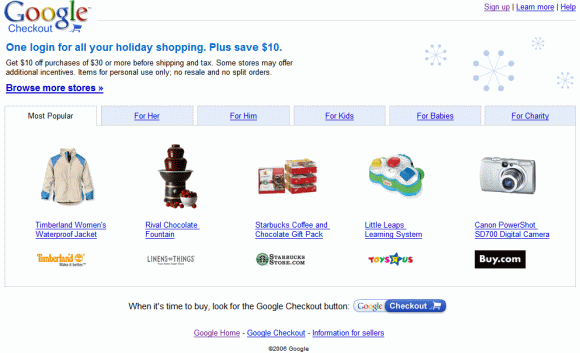
The new Google Checkout site created for holidays is now live and includes a small selection of colorful, popular gifts. Google says thousands of merchants accept Google Checkout and, using this payment system, you'll eliminate 15 steps, on average. Another incentive is that you'll get $10 off purchases of $30, or $20 off purchases of $50 and more. You can also go to that site to make donations to charities: for the first donation of $30 or more, Google adds $10.

These days, Google Checkout is almost everywhere. Let's recap a list of places where you might see Checkout's shopping cart:

* searching for products, you'll see a Froogle OneBox and a link to products that can be bought using Checkout.


* you may see Google ads that have a small shopping cart.

* stores that accept Checkout and search results that can be bought from these stores are clearly marked at Froogle.

* many stores show a "Google Checkout" option.

Update: John Battelle had a bad experience with Google Checkout and took a closer look at the privacy policy.

Underground Software

All your friends use Skype, but you've found an application much better than Skype. You ask you coworkers why they still use Windows Explorer to go to a specific folder. Nobody wants to listen when you say that the Start Menu is useless or that you spend most of your time using the command-line.

If you use a software with little or no awareness and you're proud of that, tell the world about it. Don't forget to mention why you think it's special. It doesn't have to be a Windows software, but it would be nice if it were free.

Some of my underground software:
FreeRAM XP Pro - optimize your RAM
Super - convert multimedia files
Total Commander - Windows Explorer is nothing

The Inefficiency of Feed Readers

Feed readers are a very inefficient way to keep up with the news. As most news sites and blogs have feeds, you might think you save time by adding your favorite sites to a feed reader. After all, you don't have to visit them ever again if they publish full feeds or only if you find some interesting if they publish partial feeds.

Redundancy
A feed reader shows you the latest information from each site you've subscribed to. Often, many blogs discuss a single news, but you don't have all these posts at a glance. A feed reader should cluster related posts.

Closed universe
You have a list of feeds, but you can't discover new feeds organically. Your list of feeds should automatically based on your preferences.

Lack of order
There's no hierarchy in your feed reader. You may have only 5 minutes to find out what's new, but you don't know where to start. A good feed reader should rank posts and prioritize breaking news.

Sense of guilt
If you don't open/visit a feed reader for a week, you may end up with hundreds of thousands of unread posts. You may want to mark all as read and move on, but what if you lose something important? A feed reader forces you to read (or scan) each and every post.

No related universes
Maybe there are other people with similar tastes that may help you improve your universe. A feed reader should automatically detect that and suggest posts that were considered interesting by your virtual group of anonymous friends.

In most of these affirmations, I've described a typical feed reader. If you know one that does all of these things (or only some of them), let us know.

Yahoo Mail Maps Addresses


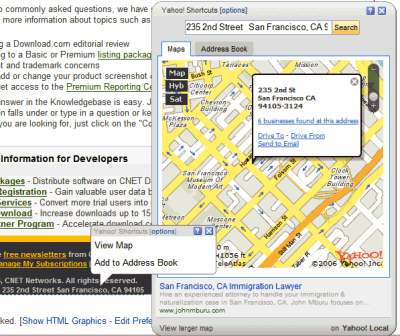
Yahoo Mail has become a little smarter. If you receive an email that includes addresses, Yahoo Mail recognizes them and underlines them, so you can easily view on a map, get directions or add to the address book. Yahoo Mail also underlines email addresses and phone numbers.

Yahoo has a very broad definition for addresses because even country names are underlined. But instead of the "add to Address Book" option, you'll see search results. If you don't like the new features, you can go to Mail Options and turn them off.

Gmail had this feature for a long time, but the integration is more subtle.

Related:
Refine search results in Yahoo Mail
The new Yahoo Mail, slowly released

Almost 90,000 PS3’s have been sold in Japan

Of course, 88,400 isn’t all that bad considering that it falls right in the middle of the 100,000 units sold Sony was shooting for and the 80,000 units Nikkei Shimbun announced just prior to the launch.

But seeing as how you can’t pick up a console with buying a game to go with it there's bound to be at least one game that wipes the slate clean. This time, there were two and the top two selling games in Japan happened to be Ridge Racer 7 and Mobile Suit Gundam: Target in Site which sold about 30,000 copies apiece.

The near-instant depletion of the consoles has driven up not only the amount of PS3’s you can find on Ebay, but you’ll see a huge surge in the asking price as well. You could easily just wait for the next shipment of consoles to buy one or you could fork over fifteen hundred dollars and pick one up of the net.

Also, some e-commerce importers have decided to not sell any imports to Europe or North America after Sony’s lawsuit win of the import site Lik-Sang which in turn, drove them out of business.

Tech system

. . . . . .
Tech Plus Systems is an Information Technology company founded in 1990 with its primary focus on software development, network integration and computer services. As a company, we are differentiated by our commitment to Open System standards, our knowledge of Client/Server networks and our ability to integrate these networks.

OUR VISION

The vision is as clear today as it was in 1990. Tech Plus Systems continues to take action to ensure that this vision will never dim. We believe that a deep understanding of systems design and development and the support services, which enhance the software solutions, is a pre-requisite to being able to assist our clients. As a result, we have made an early commitment to client/server systems development and related software design and support. Our strategy is to focus on Open System compatibility standards and to develop software applications supported by these standards. Our goal is to have a long-term impact by assisting our clients develop and implement effective information technology solutions. With a wide range of technical expertise in both midrange and server based processing, we are able to provide our clients with complete IT solutions.

OUTSTANDING CLIENT SERVICES

Tech Plus Systems is committed to building lasting relationships with our clients through a combination of technical expertise and superior support services. Computer systems, client/server software, design automation, networking, technology distribution, computer services, telecommunications and the Internet are segments in which Tech Plus Systems has established client services. Our technology knowledge and experience allow us to deliver a level of service and expertise that is both appropriate and cost-effective.

The Hype Machine - Music Search Engine

The Hype Machine is probably the coolest music search engine. That's because you can actually listen to music and because there's a lot of underground music.

The Hype Machine crawls music blogs and lets you discover songs. The site likes to think it works like Google: crawling blogs for MP3 files, storing the files in their database as a cache and offering a full preview of the songs.

"The Hype Machine exists to create a medium that favors discovery of new music through public discussion while encouraging legitimate distribution of audio." Most pages have links to music stores where you can buy the songs. There are also feeds so you can easily discover new music.

Music producers may not agree, but this is the best way to distribute and sell music: show full previews for songs and let the public decide what's cool and what's not. Now people buy popular music promoted by labels.

Related:
Music players, music stores and DRM
My favorite music videos

A New Dimension in Search?


From November 7, Microsoft promises to give us "a new dimension" for search, by enhancing its Windows Live Local service.

Virtual Earth Blog announced that Microsoft "will release a new version of the Virtual Earth Map Control on Tuesday, November 7th 2006".

I wonder if they're adding the third dimension to the maps. Windows Live Local (powered by Virtual Earth) doesn't have a great coverage for its imagery, but includes some great features like bird's eye view, scratch pad and location finder.

Virtual Earth 3D


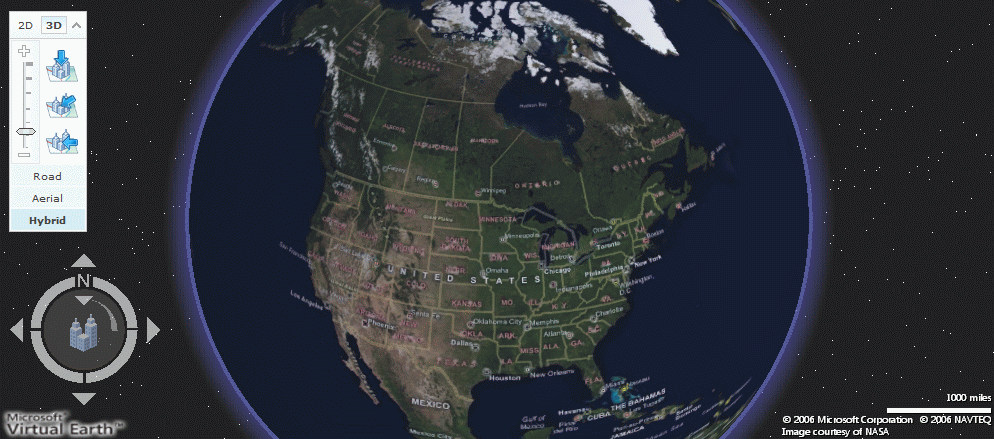
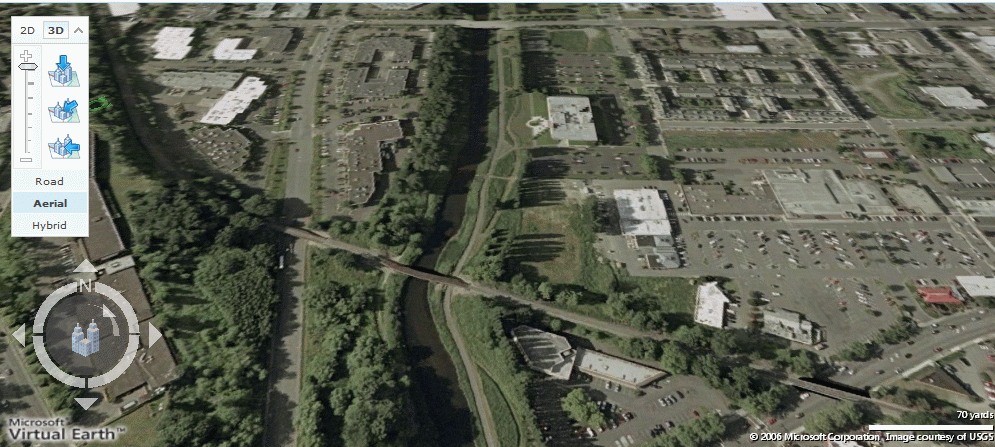
The new Windows Live Local shows the Earth in 3D. Although it requires to download a 5MB application and it needs a lot of resources, the result is an attempt to emulate Google Earth in a browser. Unfortunately, that browser is Internet Explorer.

You'll be able to see 3D maps only for major cities in the US. But they won't look very nice unless you have a broadband connection and a graphics card that supports Microsoft DirectX 9, with 3D hardware acceleration enabled.

Microsoft did an interesting thing by adding 3D maps into a browser, but they need to improve the performance of their app and the imagery.

Note: to try this, set your regional options in Control Panel to United States and open this site in Internet Explorer. But only if you have Microsoft Windows XP Service Pack 2, Microsoft Windows Server 2003, or Windows Vista.

More about Virtual Earth 3D, in NewsWeek.

10 Differences Between This Blog and Google's Blogs

1. Google Blog says it's official in the title. This blog says it's "not affiliated with Google".

2. Google's official blogs are written by more than one person. Here, there's only one person who does that.

3. Google's blogs use possessive to show their origin: "Googler insights into product and technology news and our culture".

4. Google's blogs are copyrighted by Google. This blog uses Creative Commons license.

5. Google's blogs don't show ads. This blog used to do that.

6. Every Google blog lists all the official Google blogs.

7. Google's blogs talk only about Google services and products. This blog also talks about competitor's products.

8. Google's blogs don't accept comments. This blog does.

9. Google's blogs don't have posts about yet to be released features or personal opinions about Google products. They don't start a post with: "The latest version of Google Toolbar for IE has a strange new feature: keep Google as the default search engine."

10. Usually Google's official blogs don't talk about a Google Operating System. Basically because it doesn't exist.

Update: If this post seems confusing, a post and some discussion from Google Blogoscoped might be helpful. Also read this disclaimer.

The Need for Speed in Web Applications

Marissa Mayer explained yesterday at Web 2.0 Summit that speed is one of the key issues for a web application. She said that the major reason why Google shows 10 search results by default is that the page loads faster (on average, in 0.4 seconds).

When launched, Google Maps was pretty slow, but a speed improvement brought a lot more traffic. "When the Google Maps home page was put on a diet, shrunk from 100K to about 70K to 80K, traffic was up 10 percent the first week and in the following three weeks, 25 percent more."

Also the upload process in Google Video took a day or two, so people couldn't see their video online instantly. Marissa says that's one reason why YouTube had more success than Google Video.

Instant gratification plays a big role in a great user experience. Just imagine a search result page loading in 20 seconds. How often would you use that search engine, even if the results are great?

Get a Live.com Mail Address

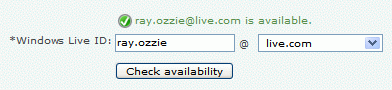
If you couldn't get a satisfying mail account at Yahoo Mail, Hotmail or Gmail, you can now get it at live.com. Although it's not yet official, it's quite easy to get a mail address like your.name@live.com.

You have to create a new account, press "sign up", then copy the location of this link and paste it in the address bar of the window where you loaded the page from live.com. Now you'll have live.com and a list of other localized domains for you to choose from.


{ Solution found by mess.be, no permalink available. }

Update (a day later): Apparently, this trick doesn't work anymore.

New fastest ftp server

News

NEW! Discussion forum at http://vsftpd.etud-orleans.fr

Jul 2006 - vsftpd-2.0.5 released

  • vsftpd-2.0.5 is released - with minor fixes. The Solaris build should now work; IE should now show the login dialog again; configurable login attempt limits and delays were added; a bad intereaction with DMAPI filesystems was fixed and chained certs should now work. Please refer to the v2.0.5 Changelog and vsftpd FAQ (frequently asked questions) for a list of common questions!
  • After numerous requests, I now have a PayPal button for donations. If you use vsftpd, like it, and think it's worthy of a donation, then click on the Paypal button on the left of the page.
  • ftp.freebsd.org switched to vsftpd.
  • vsftpd tarballs are now GPG signed by me.
Apr. 2004 - vsftpd v1.2.2 released

Please refer to the v1.2.2 Changelog and vsftpd FAQ (frequently asked questions) for a list of common questions!
Note: v1.2.2 fixes a listener hang / crash which a few sites see under heavy connect / disconnect load. This only occurs when using the inbuilt listener, i.e. inetd based installs are unaffected.

Sept. 2003 - Is any server other than vsftpd safe?

RedHat ftp.redhat.com is powered by vsftpd for performance reasons - see below

OpenBSD ftp.openbsd.org is powered by vsftpd because it needs to be very secure! - see below

Suse Someone sent me this green lizard.. (ftp.suse.com)
About vsftpd

vsftpd is a GPL licensed FTP server for UNIX systems, including Linux. It is secure and extremely fast. It is stable. Don't take my word for it, though. Below, we will see evidence supporting all three assertions. We will also see a list of a few important sites which are happily using vsftpd. This demonstrates vsftpd is a mature and trusted solution.

Features

Despite being small for purposes of speed and security, many more complicated FTP setups are achievable with vsftpd! By no means an exclusive list, vsftpd will handle:
  • Virtual IP configurations
  • Virtual users
  • Standalone or inetd operation
  • Powerful per-user configurability
  • Bandwidth throttling
  • Per-source-IP configurability
  • Per-source-IP limits
  • IPv6
  • Encryption support through SSL integration
  • etc...

Online source / docs

Browse vsftpd's online source tree - including documentation. In particular, note the content of the EXAMPLE subdirectory. Also, here is an HTML version of the manual page which lists all vsftpd config options.

Download / support

The latest vsftpd release is v2.0.5, currently at ftp://vsftpd.beasts.org/users/cevans/
Releases are infrequent since bug reports are infrequent at this time.

Is vsftpd the right server for me?

If your main requirement from an FTP server is one of the following things then yes, vsftpd is probably the FTP server you are looking for.
  • Security
  • Performance
  • Stability
The only reason you might prefer a different FTP server to vsftpd is if you really need the configurability of one of the more bloated FTP servers. Having said this, note that vsftpd caters for the vast majority of use cases. Even if vsftpd appears to be missing a feature, it is often satisfied by an external component such as PAM or xinetd / tcp_wrappers. In this regard, vsftpd is being a small modular component in the proper spirit of UNIX. Finally, consider moving to vsftpd even if it means sacrificing some whacky feature of your current FTP server. The security, performance and stability gains are waiting for you.

What are people saying about vsftpd?

  • The SAC team from SANS recommend vsftpd as the preferred secure FTP server: "For those of you looking for a secure FTP daemon alternative, the SAC team recommends vsftpd".
  • IBM recommend vsftpd in their paper "Securing Linux Servers for Service Providers". It is top in a section entitled "Recommended FTP servers".
  • RedHat praises the performance and scalability of vsftpd in a press release: "Individual servers handled more than 2,500 concurrent downloads"... "The other change was to use a very lightweight FTP daemon, vsftpd, designed for the demands placed on a server under this level of load".

What large sites are trusting vsftpd?

NOTE!! The following list is accurate as of Jun 2004 (things may change over time of course). This is just a small sample of lots of critical internet sites which use vsftpd.
  • ftp.redhat.com
  • ftp.suse.com
  • ftp.debian.org
  • ftp.openbsd.org
  • ftp.freebsd.org
  • ftp.gnu.org
  • ftp.gnome.org
  • ftp.kde.org
  • ftp.kernel.org
  • rpmfind.net
  • ftp.linux.org.uk
  • ftp.gimp.org
  • ftp-stud.fht-esslingen.de
  • gd.tuwien.ac.at
  • ftp.sunet.se
  • ftp.ximian.com
  • ftp.engardelinux.org
  • ftp.sunsite.org.uk
  • ftp.isc.org

Please sell me more on vsftpd security!

Certainly. vsftpd was designed and implemented from the ground up with security in mind.
  1. It fixes fundamental design flaws present in most installations of wu-ftpd, proftpd and even bsd-ftpd by not over-using the dangerous root user.
  2. It makes use of powerful security facilities such as capabilities and chroot.
  3. It employs secure coding techniques to make buffer overflows a solved problem.
  4. It is written by someone who is a vulnerability researcher.
For more details on why vsftpd is secure, see the distributed documentation files: Online copies are here:

Please sell me more on vsftpd performance!

Of course.
  • A usenet poster finds vsftpd twice as fast as BSD-ftpd (which is itself no slouch, unlike wu-ftpd).
  • Someone benchmarking vsftpd over localhost shifts 70Mbyte/sec, which in their case was more than the awesome TUX (55Mbyte/sec). (link lost)
  • Someone bechmarking Linux's networking over gigabit ethernet is using vsftpd, and vsftpd scores 86Mbyte/sec. (link lost)
  • Referring to RedHat's use of vsftpd, Alan Cox in his diary says " finally we have a scalable ftpd for Linux".

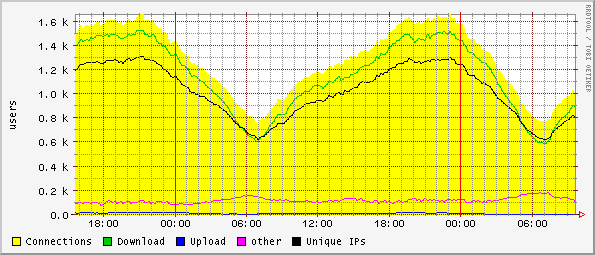
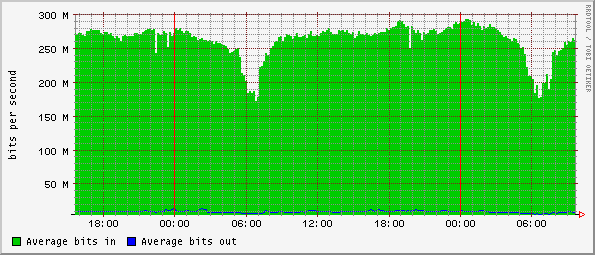
Here are a couple of graphs sent in by a satisfied user, running a large internet site with vsftpd.

Over the 24 hours, vsftpd has served 2.6TB (yes, terabytes) with a concurrent user count often over 1,500. This is on a single machine.

Graph of users
Graph of traffic

Naked Google SERP

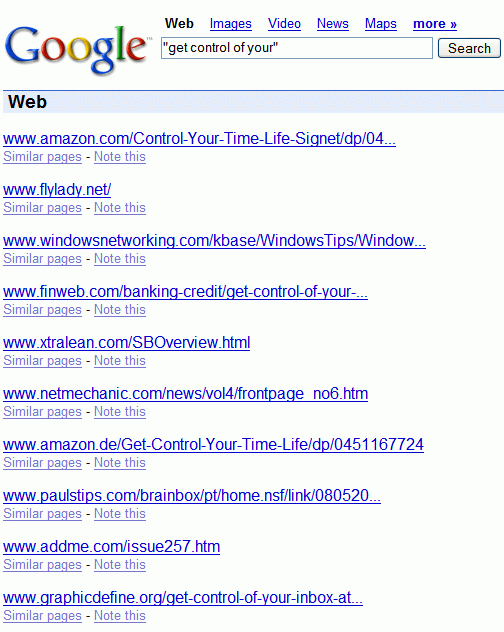
A naked Google search result page shows only the URL for each result. You won't see titles, snippets or links to the cache version. You may think there are entries in the robots.txt files that prevent Google to index these pages, but that's not the case.

Click on the screenshot to see the top 10 search results. Note that there's a good chance you can't reproduce it.

New in Page Creator: Photo Editing and Mobile Sites

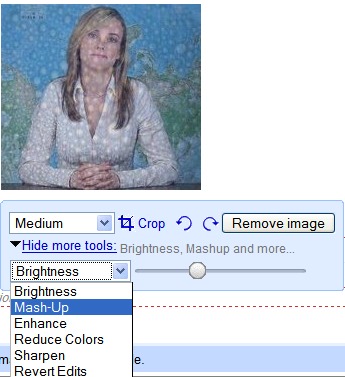
When you add a photo to Google Page Creator, you'll see new options. You can now crop a photo, rotate it, change the brightness, mix it with another photo, change the contrast, reduce the colors or sharpen the photo. Basically you can apply simple effects from your browser. In the screenshot below, I've used the mash-up effect.


Now every page created in Google Page Creator can be easily accessed from a mobile phone, as Google redirects it to the transcoded version, the same way it does with the search results. Of course if you manage to enter the long URL correctly.

Also interesting:
Hide a site in Google Page Creator
Page Creator supports JavaScript

Preview Gmail Conversations

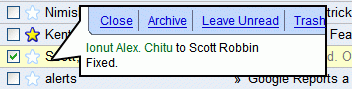
Mihai Parparita from Google created a brilliant Greasemonkey script last year. The script lets you right-click on a Gmail conversation and get a preview in a bubble. This way, you can read your mails faster, especially if you only want to read some of them.


The new Yahoo Mail and Windows Live Mail have a reading pane where you can preview your messages, but that takes a lot of space. This solution has the advantage that it's available on demand.

I know this is far from being new, but I've always wanted this feature in Gmail.

Greasemonkey details:
You need to have Greasemonkey in Firefox or Trixie in IE
Then install the script

Google Maps : Saved Locations

GOOGLE MAPS : SAVED LOCATIONS
Google Maps shows a new link at the top of the screen called "Saved Location". This feature is available in all Google Maps versions.

You can save your searches, add a label to the locations, choose your location by default. Google Suggest is built-in: in this example (screenshot), if you type "G", Google Maps allows you to select directly Googleplex or Google France.

These features have already been available on Google Maps' competitors for a while...

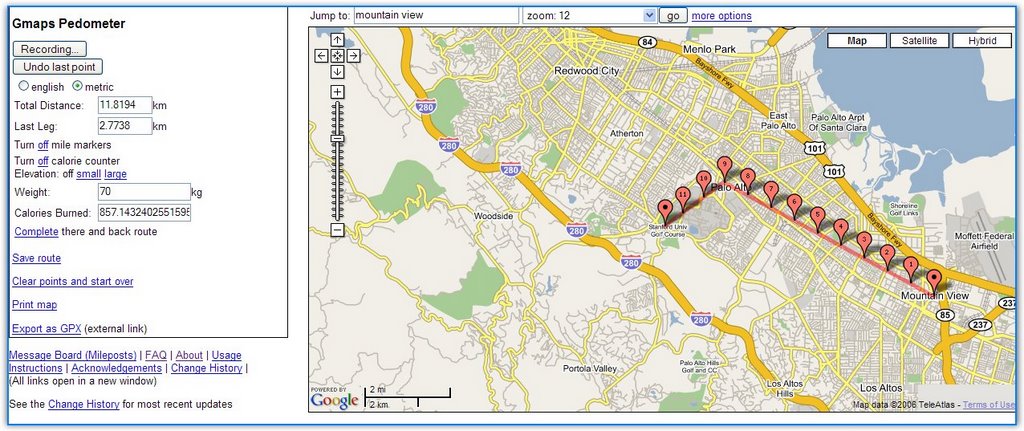
Create Running Routes With Google Maps


Gmap Pedometer is a site that uses Google Maps to let you record distances between two or more places. You can create routes for your running, see how many calories you're going to burn and save the route for further referencing. The author of the site explains: "As a runner training for a marathon for the first time, I found myself wishing I had an easy way to know the exact distance a certain course is, without having to drag a GPS or pedometer around on my runs." It's always a good idea to get some exercise at least once in a while, if not every day. And you can use the new iPod Nike shoes.

Related:
Google Maps with photos
Anthropomorphic Google Maps

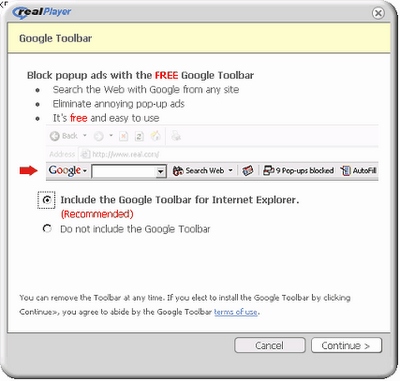
Real Player Bundles Firefox And Google Software


Forbes reports that RealNetworks, the creators of the (un)popular media player RealPlayer, have signed a two-year agreement with Mozilla to bundle Firefox with its software (RealPlayer, Rhapsody and RealArcade). They've also signed a contract with Google to distribute Google Toolbar and Google Desktop.

Google continues to focus on making distribution deals (see Dell agreement, Adobe deal) as a way of increasing its desktop presence. Google and RealNetworks have a long history: RealPlayer is bundled with Google Toolbar from 2004 and Google Pack includes RealPlayer as an optional download.

RealPlayer has a bad reputation, as it used to bundle spyware software and it has a bloated UI. It was ranked number two on the PC World's Top 25 Worst Tech Products of All Time:

"A frustrating inability to play media files--due in part to constantly changing file formats--was only part of Real's problem. RealPlayer also had a disturbing way of making itself a little too much at home on your PC--installing itself as the default media player, taking liberties with your Windows Registry, popping up annoying "messages" that were really just advertisements, and so on."

Many people have chosen to use Real Alternative to be able to play Real media files. Others install RealPlayer, but play the files with another compatible player.

But for Google, this is just another distribution deal.

Monday, November 27, 2006

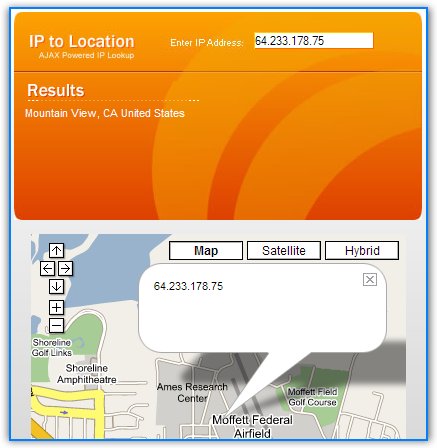
Find IP Location With Google Maps


SEOmoz has created a tool that allows you to enter an IP and to locate it on Google Maps. The application uses Ajax so it will display the map as you type (it's useful to test Class C IP ranges).

So next time you find a strange IP in your stats, or when you want to find the address of someone and you know only the IP, use this mashup. The results are not extremely accurate as there are many ways to hide the IP and many machines are behind a NAT.


Note: I'll be gone in a short vacation, but that doesn't mean I won't be around. Starting from tomorrow TomHTML from Zorgloob will keep you company. He asked me to tell you he's not fluent in English, but I'm not etext/javascript">

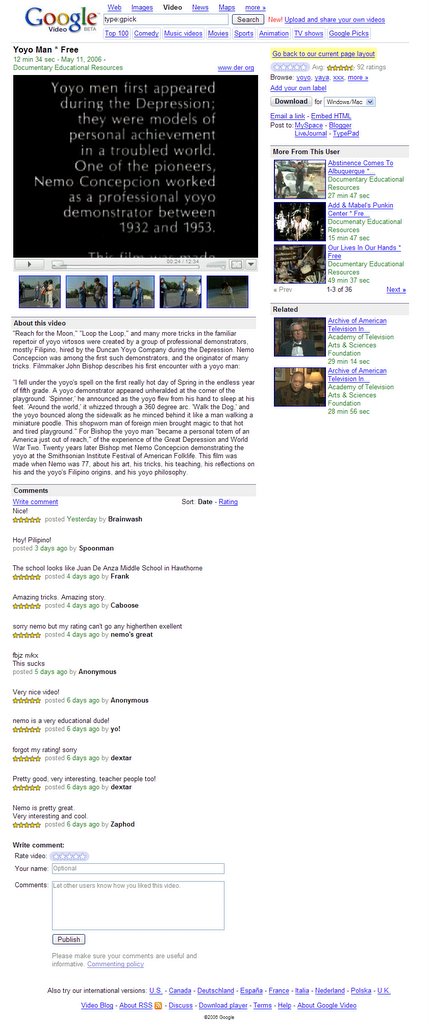
New Design Experiment In Google Video


Google Blogoscoped reports a new interface experiment in Google Video. This time, it's not about the homepage, but the video page. I always liked in Google Video that the content gets the most screen space. In this experiment, Google Video tries to mimic YouTube so hard, that it's just a pale copy. The comments are placed below the video and the related video take more space. It's very hard to compete with YouTube, but losing your identity is not the right way.

To see the new layout, go to a video page and paste this in the address bar:

javascript:setCookie('np','new');window.location.reload();

If you don't like the new design, you can always go back to the current one. If many people revert to the previous layout, Google will keep it.

Why Is YouTube More Popular Than Google Video?


YouTube, a video site created by three former PayPal employees in 2005, accounts for more than 60% of all videos watched online in the US. Google Video has a such a small share that it's not worth mentioning (things will change a little now that Google Video is linked on Google.com). Why is that?

1. YouTube is perceived as a video site. Google is a search engine that also has a video section. In addition, Google Video has disappointed twice: it was first a TV shows search but without videos and then a site that required a software to play videos (a version of VideoLAN).

2. YouTube is more open: it shows the number of views, links to a video, so you can have a better perspective about a video. Google shows the number of views only to the upoaders.

3. YouTube is more focused on the community: you could post comments from the beginning, you can post video responses and replies.

4. YouTube lets you have favorite videos, so it's easy to view the same videos again. Google lets you find the videos in the search history and bookmark it, but it's more difficult to do it.

5. You can create playlists in YouTube, and share them. There are also channels you can subscribe to. Google Video's playlists are only derived from search results.

6. In YouTube you can become a member of a group and discuss all sorts of topics related to videos. The videos are an excuse for discussion.

7. YouTube lets people create an online identity, so it's closer to a social network. You can send messages to users, add to friends, subscribe to his/her favorite videos.

8. Popular doesn't always mean great. YouTube has a list of top rated videos and controversial videos. It's reassuring to know that a video has 500 excellent ratings from 3000 views.

9. YouTube has a better search. You can sort the results by number of views, rating, search in playlists and channels.

10. YouTube has a lot of free music videos and TV shows without having the legal right, so it attracts more people. Google is more inclined to remove copyrighted content and to sell premium videos. So YouTube has a more rebellious image.

To conclude, I'll say that Google Video should not try to copy YouTube's design, and let people do more with the videos, find out more about the videos and connect them in a meaningful way.

Related:
10 Google Video tips
Google Video on Google homepage

The Network Will Truly Be the Computer

Google's CEO, Eric Schmidt, wrote some interesting things in The Economist, and most of his beliefs are reflected in Google's plans.

The internet is much more than a technology—it's a completely different way of organizing our lives. But its success is built on technological superiority: protocols and open standards that are ingenious in their simplicity. Time after time they have trounced rival telecommunications standards that made perfect commercial sense to companies but no practical sense to consumers. (...)

In 2007 we'll witness the increasing dominance of open internet standards. As web access via mobile phones grows, these standards will sweep aside the proprietary protocols promoted by individual companies striving for technical monopoly. Today's desktop software will be overtaken by internet-based services that enable users to choose the document formats, search tools and editing capability that best suit their needs. (...)

Today we live in the clouds. We're moving into the era of "cloud" computing, with information and applications hosted in the diffuse atmosphere of cyberspace rather than on specific processors and silicon racks. The network will truly be the computer. (...)

The lesson is compelling: put simple, intuitive technology in the hands of users and they will create content and share it. The fastest-growing parts of the internet all involve direct human interaction.

Although Google doesn't want to admit they want to beat Microsoft, they bet on Internet's power to beat the desktop monopoly.

Google Video - Legal Problems in Europe

A video uploaded to Google Video, that showed four teenagers beating an autistic classmate, stirred a lot of comments in Italy, reports Reuters. Two Google employees are under investigation, as a result of a complaint filled by Vividown, an Italian association. "There was this very disturbing video which was posted on Google Video a couple of weeks ago and we promptly took it down when we were notified," said Rachel Whetstone, from Google.

"In the footage the boy is taunted, insulted and kicked by one student in particular as others look on. The location seems to be a classroom and the people visible appear to be about 16 years of age."

The phenomenon of bullying is not new, but these aggressive children who like to abuse weaker or powerless children find another cruel pleasure in showing the humiliation to the world. What nobody noticed is that Google is just an intermediary between those who upload videos and the viewers. It's difficult to check (manually or algorithmically) if a video violates copyright laws or other laws and regulations. And even if the video hadn't been hosted on Google Video, it would have been on other sites.

In France, the producer of a film titled "The World According to Bush" wants 500,000 euros from Google, as his film has been uploaded to Google Video without permission. Flach Film, the production house, has an interesting point of view: "Google had not acted as a simple host but as a fully responsible publisher". They probably think Google has uploaded their film on purpose.

These cases aren't unique. Last week, a Digg user found the animation film Cars available for free at Google Video.

Google Video and other online video sites have a simple policy: users are responsible for the uploaded videos and if content owners complain, they'll take down the videos.

Gaia-Open Source Google Earth

Gaia is "an attempt to reverse engineer Google Earth and implement its functionality in open, portable, customizable and [extensible] way".

Although the project is far from being completed, Gaia supports Keyhole authentication, 3D earth view, navigation, layers, NMEA GPS.

It will be interesting to watch this project and the added functionality. Google Earth is a proprietary application that runs on Windows, Mac and Linux, but lacks a real API. An open source alternative to Google Earth is NASA World Wind, which, ironically, is a Windows-only application.

Powerful Search Features in Netvibes

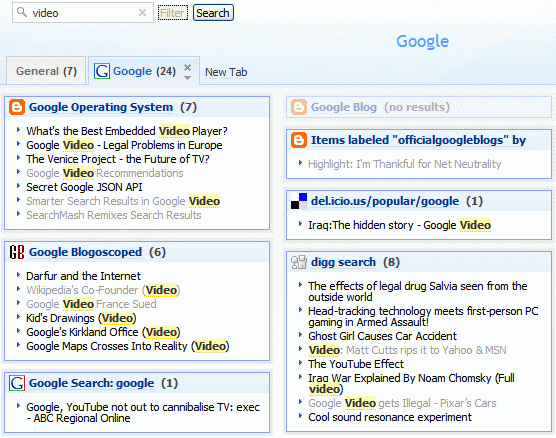
Here's an interesting new feature from Netvibes, probably the best personalized homepage. Now you can perform a search in all your feeds simultaneously. You can filter only recent content from your feeds, and also from other modules like Gmail or ToDo list. While searching your feeds is not something innovative, this feature is powerful because you can see each feed separately.


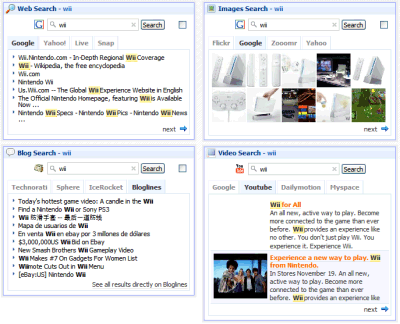
But the fun starts when you add search modules for web search, image search etc. If you click on Search, you'll get results from all the search engines and for all the search flavors simultaneously. To see the snippets, you have to hover over each search result, but that's the price you have to pay in order to see all this information in one place.


I know what Google would say: "but we have Google Ajax Search API", and it's very nice, but Netvibes' solution is simpler and works for almost any module.

The Full Google Master Plan 1.0

The Full Google Master Plan 1.0


Google's Master Plan, from the lobby whiteboard, has been erased two months ago. Chris diBona says: "It was getting kind of crufty." The mix of serious plans with geek humor shows a lot about Google's culture. From hiring hardware engineer to redesigning TCP/IP and HTTP, from the space elevator to buying AOL, from Google OS to Noosphere, and finally to saving the world.

You can see the now-erased Master Plan in a series of photos taken by Chris diBona and licensed under Creative Commons Attribution-ShareAlike license if you go to this album (you should click on magnify button to see each photo clearly). Or you could check the plan in one single high-resolution image from Undergoogle.com.

{ Rediscovered by Googlified. }

Google's Ranking Algorithm

Many people have tried to find how Google ranks web pages. While the algorithm is still secret and in continuous change, we know it uses more than 200 signals, one of the most important being PageRank.


As Google explains... "the heart of our software is PageRank, a system for ranking web pages developed by our founders Larry Page and Sergey Brin at Stanford University. And while we have dozens of engineers working to improve every aspect of Google on a daily basis, PageRank continues to provide the basis for all of our web search tools."

Compiling the opinions of webmasters, search engine optimizers and Google's explanation, Google Ranking Factors - SEO Checklist is a long list of positive and negative factors that may influence a page's ranking. While the list contains a lot of interesting observations and suggestions, you should take everything with a grain of salt.

Annotate Gmail Messages

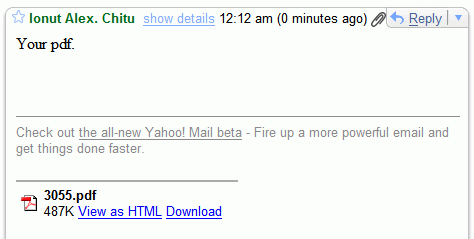
Sometimes people forget to write descriptive subjects when they send mail. Sometimes they just drop some files there and send a message with a blank body. And if the attached files have names like 1.doc, your chances to find that mail later are almost null. Unfortunately, Gmail doesn't have an annotation feature that would let you insert some comments in a mail you've just received. To make sure you'll find that messages, you could send a reply to yourself that contains a small description of the attachments.

It's a small compensation until Gmail has an option to search the contents of attachments.

Google Calendar Launched

Wouldn't it be great to be able to keep track of all the events in your life, coordinate schedules with friends and family, and find new things to do -- all with one online calendar? We thought so, too.

* Seeing the big picture
With Google Calendar, you can see your friends' and family's schedules right next to your own; quickly add events mentioned in Gmail conversations or saved in other calendar applications; and add other interesting events that you find online.

* Sharing events and calendars
You decide who can see your calendar and which details they can view. Planning an event? You can create invitations, send reminders and keep track of RSVPs right inside Google Calendar. Organizations can promote events, too.

* Staying on schedule
You can set up automatic event reminders, including SMS notifications, and instantly bring up anything on your calendar with the built-in search tool.


That's how Google Calendar / Google CL2 says welcome after so many months of waiting.


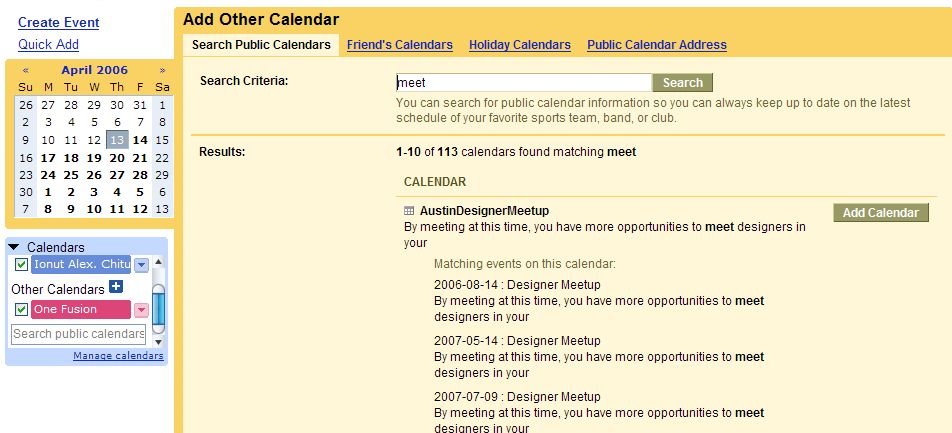
The service is integrated with Gmail, so you can switch between Gmail and Google Calendar and add events from Gmail, with Google Maps, so you identify a location. You can search your calendar, public calendars, your friend calendars. You can choose to be notified of an event by email, SMS, or by phone call. Google Calendar can import event information in iCal or CSV (Outlook) format.


Overall, Google Calendar doesn't feel impressive and has a catch: all the events you create on a public calendar are public by default. On a normal calendar, all the events you create are visible only to the persons you've shared your calendar with. So make sure you understand what public / private means.

Easter Egg: Search for [Google Calendar Tips] on public calendars and add the first calendar from Google Calendar Team. It has many good tips & tricks.

Update: you don't need to have Gmail to use Google Calendar, you just need to have a Google Account.

Google Pages you've Never Seen

Google Moms
A tribute to Googlers' moms.

Google AdSense for domains
AdSense for domains allows domain name registrars to fill the otherwise blank pages with AdSense ads.

Google Sets
Google Sets is the oldest Google product that never graduated Google Labs. Using Google Sets, you can create sets of items from a few examples.

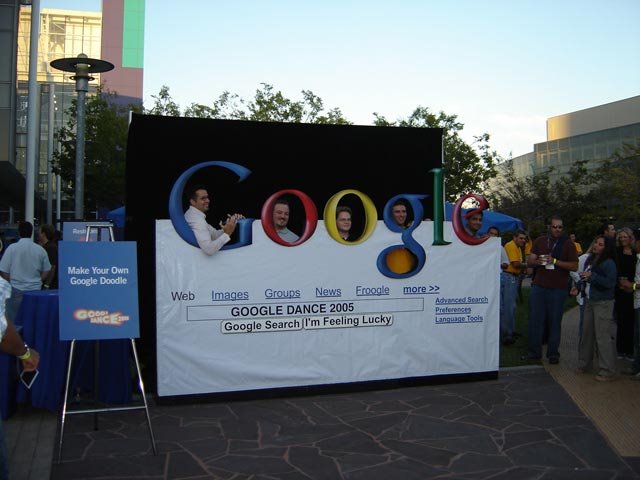
Google Dance 2004
Also Google Dance 2005.

Get stock with Google
Google provides stock and mutual fund information since 2001.

Google doesn't sell search results
Google talks about the integrity of its results and answers this tricky question: "In a world where everything seems to be for sale, why can't advertisers buy better position in our search results?"

Google WiFi
Google provides free WiFi in Mountain View through Google Secure Access, a client that makes the WiFi connection more secure.

Google Newsletter
You knew Google has a blog, but you didn't know they have a newsletter called Google Friends. You can read the full archive.

Chad's journey to Jersey
One bike. One Googler. One really long ride.

Google Easter Eggs
A Java game with an Easter bunny.


The Information was copy from google operating system

Daylight Map

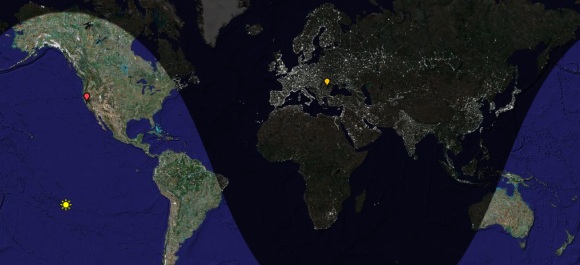
Daylight Map is a segmentation of the Earth using the day/night criteria. You can add places on the map and even change the date. The site also shows you the local time for each place you add on the Google map. If you bookmark a permalink to the current state, you can check it later. I think this presentation is more attractive than some random world clocks.

You probably know that if you search for [time in city-name], the major search engines show direct answers at the top of the page.

Make your own live radio by shoutcast

SHOUTcast is Nullsoft's Free Winamp-based distributed streaming audio system. Thousands of broadcasters around the world are waiting for you to tune in and listen. Take a peek through the SHOUTcast directory (immediately listed below) to start browsing the most popular stations. Be sure to select your connection speed and then what kind of music you're looking for over on the right hand side for optimal listening pleasure. All you need is a player (we recommend Winamp) and you're set to go!

Wanna be a broadcaster? It's Free! Check the online docs to get started!

The Venice Project

Here's something interesting from TV's future: the Venice Project, "a secure P2P streaming technology that allows content owners to bring TV-quality video and ease of use to a TV-sized audience mixed with all the wonders of the Internet". The project tries to improve the TV experience by removing "artificial limits such as the number of channels that your cable or the airwaves can carry and then bringing it into the internet age; adding community features, interactivity".

The new service comes from the same people that created Kazaa and Skype, Niklas Zennstrom and Janus Friis. For the moment, the Venice Project is in closed beta.

Janus explains: "We are trying to bring together the best of TV with the best of the Internet. We think TV is one of the most powerful, engaging mass medias of all time. People love TV, but they also hate TV. They love the (sometimes…) amazing storytelling, the richness, the quality itself. But they hate the linearness, the lack of choice, the lack of basic things like being able to search. And wholly missing is everything that we are now accustomed to from the Internet: tagging, recommendations, choice, and so on… TV is 507 channels and nothing on and we want to help change that!"

Skype is the bast software that allows you to make calls from your computer.


Skype is a little piece of software that allows you to make calls from your computer. Talk for as long as you like without worrying about the cost or the distance.


  • Free Skype-to-Skype calls
  • Make video calls
  • Send cheap text messages
  • Easy conference calling
  • Free to download